
In the ever-evolving landscape of data management, the need for scalable and efficient storage solutions has become paramount. As businesses grow, so does their data, transitioning from simple files to complex, multi-structured datasets encompassing customer interactions, product analytics, sales data, and more.
In my exploration, I initially managed everything within a traditional storage account. It was simple, familiar, and seemed sufficient for storing and organizing various data types. However, as the data became more complex and voluminous, it became clear that traditional storage wasn’t keeping up with the demands of large-scale data operations.
Enter Azure Data Lake Storage
Azure Data Lake Storage (ADLS) emerged as a robust solution designed to handle massive volumes of structured and unstructured data. Unlike traditional storage accounts, ADLS allows data to be stored in its raw format—be it text files, images, video, or log files—without the need for upfront cleaning or processing.
With ADLS, I could store raw data and optimize it for high-performance analytics and processing. This flexibility was key, as it allowed complex queries to be executed directly on the data without worrying about file formats or storage hierarchies. The hierarchical namespace feature gives the ability of ADLS to scale effortlessly as data grows further highlighted its suitability for large-scale data management.
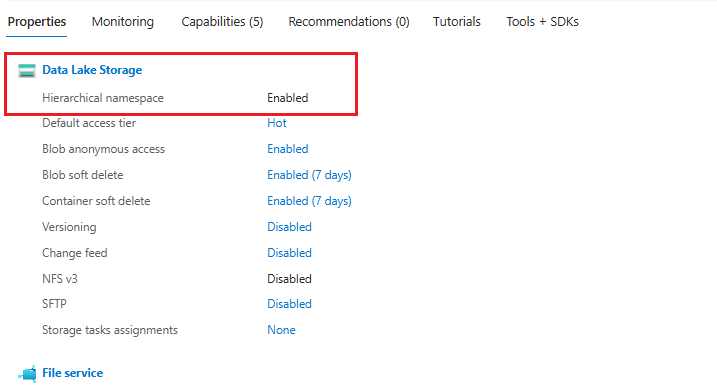
Unveiling the Snapshot Feature
However, as I dug deeper into the capabilities of ADLS, one feature particularly caught my attention: Snapshots. In the context of a Well-Architected Framework—where resilience and recovery are crucial design principles—the Snapshot feature is invaluable. It allows for capturing the state of data at specific points in time, providing a way to recover data quickly in the event of accidental deletions or corruption.
Roadblock and Resolution
Despite Azure announcing the Snapshot feature for ADLS back in 2020, I discovered that it wasn’t enabled by default in my subscription. This was a significant finding, as I had been eager to test this feature to ensure data resilience in my setup.
To move forward, I created a function app to perform a snapshot backup within my subscription. This function app code is available on my GitHub for anyone interested in exploring similar functionality. Backup solution using Function App & TypeScript
During testing, the function app encountered errors due to the unavailability of the Snapshot feature in my subscription.
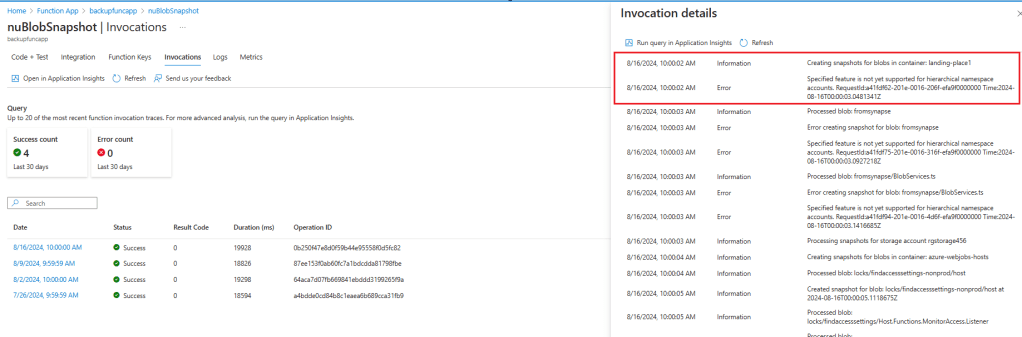
This led me to investigate further, and I found that to use this feature, you need to apply for it to be enabled. Azure requires filling out a form to gain access to the Snapshot feature within your subscription. Snapshots Overview – MSFT Learn
Conclusion
This experience has highlighted the importance of understanding the availability and requirements of specific features in cloud services like Azure. While ADLS provides powerful capabilities for managing large-scale data, the Snapshot feature, though announced for public preview in 2020, still requires manual enablement. ADLS Snapshot Announcement
For those looking to implement similar solutions, I recommend applying for the Snapshot feature early in your setup process to ensure you can fully leverage its benefits.
For more details, you can find the function app code on my GitHub, and if you’re interested in enabling the Snapshot feature in your Azure subscription, be sure to check out Azure’s documentation and submit the necessary forms.
 RAFA MUSINGS
Leave a comment